
Stop retyping
your invoices.
AI reads the PDF invoices that land in your inbox, saves the details to Airtable and asks a person to approve. Built for businesses in the US, UK, Canada and Europe.
Invoice processing automation takes invoices that arrive by email as PDFs, uses an AI model to read them, stores the data in a database such as Airtable, and alerts a person to approve each one. It replaces manual typing and keeps a human in control. This is a working automation we built and run ourselves, and a live demo is available on request.
From inbox to organised record.
The six steps of our working invoice automation, built in Make with Google Gemini and Airtable.
Invoice arrives by email
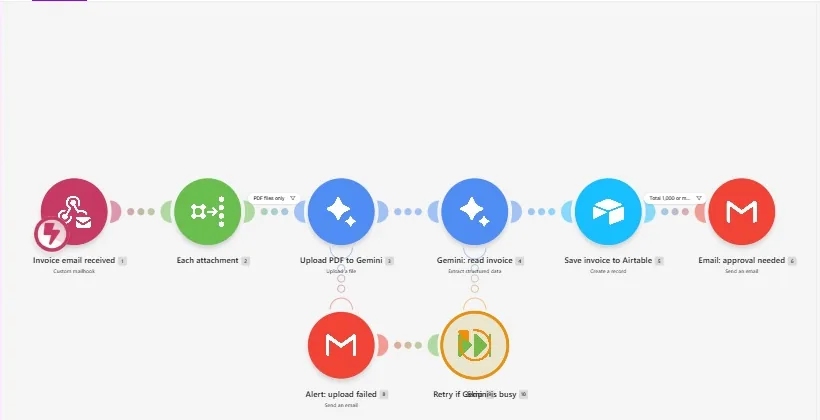
Suppliers send invoices to a dedicated address. Every attachment is picked up automatically.
PDFs are filtered
Only PDF attachments continue, so logos, signatures and other files don't clutter your records.
AI reads the invoice
Google's Gemini model reads each PDF and extracts the vendor, invoice number, dates, total, tax and currency into structured fields.
Saved to Airtable
A new record is created for each invoice, ready to search, filter and export.
A person approves
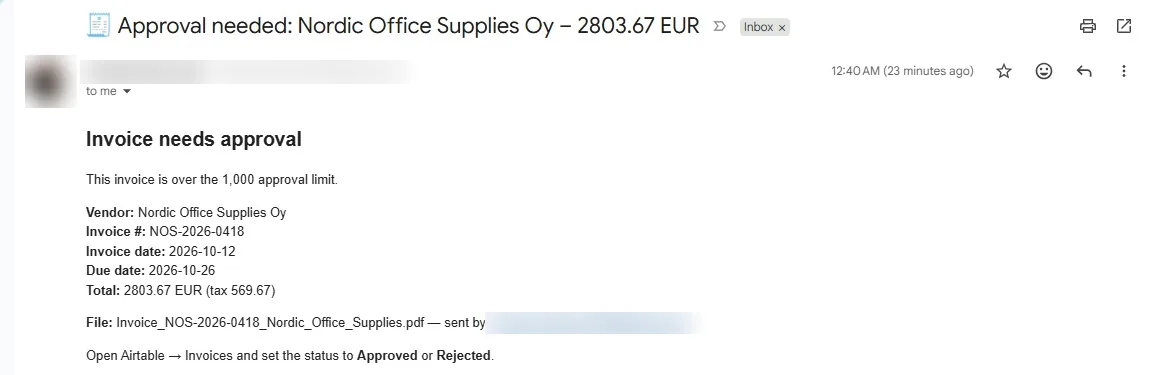
Invoices over your approval limit trigger an email with the key details, and you mark them Approved or Rejected in Airtable, so a human has the final say.
Errors are handled
If the AI can't read a file you get a 'could not read invoice' email so it can be added by hand, and if the AI service is busy the workflow retries on its own.
The published invoice workflow.
Our working invoice automation: the Make scenario, the Airtable record it creates and the approval email it sends.

Screenshots are from our own published demo workflows. All names, phone numbers and emails shown are sample data, not real clients or patients.
Less typing, with a person still in charge.
- No more retyping invoice details into a spreadsheet
- One searchable record for every invoice
- A human approval step before anything is final
- Alerts when something fails, so nothing is silently lost
- Works on invoices that arrive by email as PDFs
- Can be extended to your accounting software if it has an API
AI can misread unusual layouts or poor scans, so we test on your real invoices before launch and keep the approval step in place.
Questions about invoice automation.
What is AI invoice processing automation?
It is a workflow that reads invoices automatically instead of a person typing them in. In our build, an invoice arrives by email, an AI model reads the PDF, the details are saved as a record in Airtable, and a person gets an email to approve it.
Is the AI always accurate?
No AI reads every invoice perfectly, especially scans or unusual layouts. That is why the workflow includes an approval step where a person checks the result, and why we test it on your real invoices before launch.
Which tools does it use?
Our working version uses Make for the workflow, Google's Gemini model to read the invoices, Airtable to store the records and email for alerts. It can be adapted to other tools that offer an API, such as Google Sheets or accounting software.
Can it connect to QuickBooks, Xero or other accounting software?
Often yes, if the software has an API or a Make, Zapier or n8n connector. We check your specific software before we quote, and where a direct connection isn't possible we can export to a spreadsheet instead.
Is my invoice data safe?
Invoice PDFs are processed by the services in the workflow (Make, Google Gemini and Airtable) over encrypted connections. We collect only what the workflow needs and sign an NDA on request. We hold no formal security certifications, so tell us your privacy requirements, such as GDPR, before we start.
Have you used this for clients?
Not yet. It is a working automation that we built and run ourselves, and we are taking on our first client projects. A live demo is available on request.
How much does it cost?
Each project is quoted individually after a short call, based on your invoice volume, formats and the tools involved. You get a written quote before any work starts.
See it work on your invoices.
Request a Live DemoFree short call. Written quote. No obligation.